
Diferencia entre revisiones de «Translations:Router/68/en»
De wiki.kiconex
Página creada con «* Click on '''NETWORK>WIRELESS'''': center|miniatureimage|800x800px|WiFi network menu * Click to '''enable''' the existing WiFi network and click on the '''configuration''' '''symbol''': center|miniaturadeimage|800x800px|Enable WiFi network] * Configure the desired SSID in the '''''GENERAL SETUP''''' section:» |
Sin resumen de edición |
||
| Línea 1: | Línea 1: | ||
* Click on '''NETWORK>WIRELESS'''': [[File:Network-wireless menu.png|center|miniatureimage|800x800px|WiFi network menu]] | * Click on '''NETWORK>WIRELESS'''': [[File:Network-wireless menu.png|center|miniatureimage|800x800px|WiFi network menu]] | ||
* Click to '''enable''' the existing WiFi network and click on the '''configuration''' '''symbol''': [[File:Enable wireless.png|center|miniaturadeimage|800x800px|Enable WiFi network | * Click to '''enable''' the existing WiFi network and click on the '''configuration''' '''symbol''': [[File:Enable wireless.png|center|miniaturadeimage|800x800px|Enable WiFi network]] | ||
* Configure the desired SSID in the '''''GENERAL SETUP''''' section: | * Configure the desired SSID in the '''''GENERAL SETUP''''' section: | ||
Revisión actual - 07:45 11 abr 2024
- Click on NETWORK>WIRELESS':
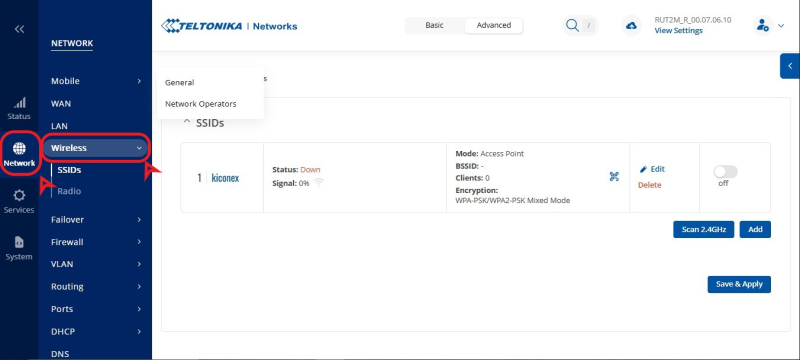
WiFi network menu - Click to enable the existing WiFi network and click on the configuration symbol:
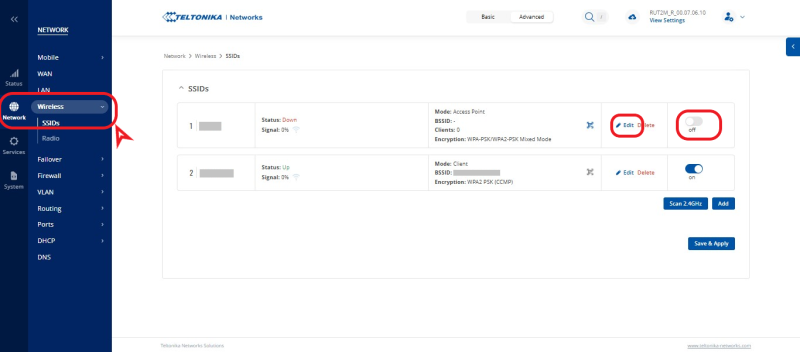
Enable WiFi network - Configure the desired SSID in the GENERAL SETUP section:


